Stop Evaporating Your AI Tokens: The Developer’s Guide to Context Hygiene
Published on 2026-04-20
Stop Evaporating Your AI Tokens: The Developer’s Guide to Context Hygiene
If you’ve been using Claude Code recently, you’ve likely hit a usage limit right in the middle of your flow state. It’s a frustrating bottleneck, especially when you’re paying for a premium tier. But the underlying issue isn’t actually about Anthropic’s rate limits—it’s an architectural problem with how developers are managing their AI sessions.
The solution lies in a concept called “context hygiene,” which requires a fundamental shift in how you configure your project files, manage system tools, and interact with the CLI. Here is the underlying justification for why your tokens are vanishing, and the exact approach you should take to stop the bleeding.
The Justification: The “Token Tax” and Exponential Cost
To optimize Claude Code, you first have to understand the math behind how Large Language Models charge you. Every single time you send a message, Claude must re-read the entire conversation history from the very beginning.
1. Compounding Expenses
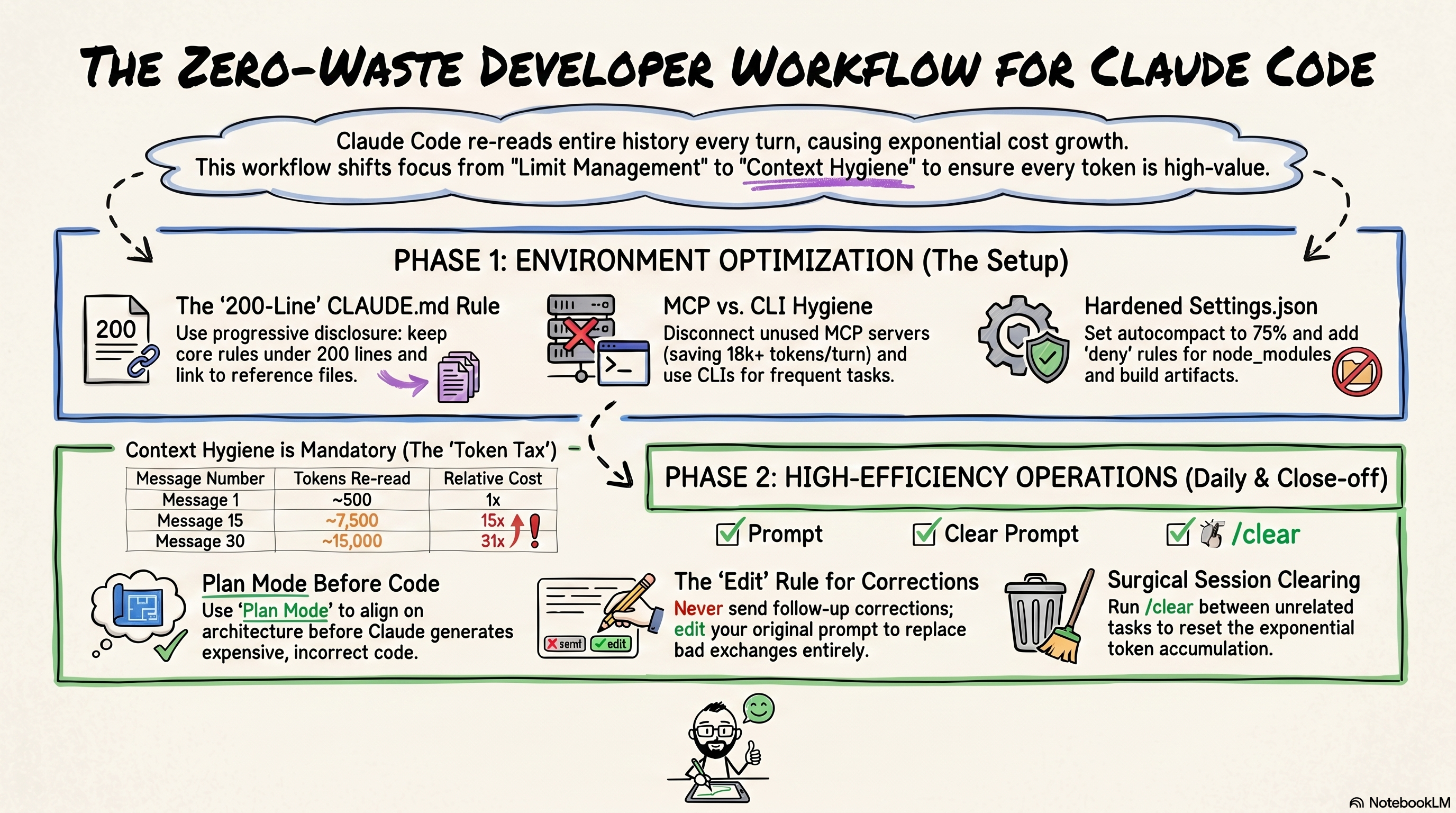
Your token cost does not scale linearly; it compounds exponentially. Message 30 in a session costs 31 times more than message one. One developer found that in a 100-message chat, 98.5% of all tokens were spent just re-reading old chat history.
2. The Invisible “Background Bloat”
There is “invisible context” loaded into every single API turn. Before you even say “hello,” Claude pre-loads your CLAUDE.md files, installed skills, system prompts, and MCP (Model Context Protocol) servers. If you run the /context command in a fresh terminal, you might find you are already paying a “token tax” of 50,000 tokens per message just from background bloat.
3. “Loss in the Middle”
Bloated context doesn’t just drain your wallet—it ruins your code. Due to a phenomenon called “loss in the middle,” LLMs pay the most attention to the beginning and end of a context window. If you stuff the middle with irrelevant background data, Claude will start ignoring vital instructions and outputting lower-quality work.
The Approach: 4 Steps to Perfect Context Hygiene
You need to ruthlessly prune this invisible bloat. By treating your context window like precious RAM, you can dramatically extend your coding sessions. Here is the developer-friendly playbook for optimizing your environment:
1. Kill the Invisible Background Processes
Your development environment is likely leaking tens of thousands of tokens per turn. You need to plug these holes in your settings.json:
Disconnect Idle MCP Servers: Every connected MCP server loads all of its tool definitions into context on every turn. Run /mcp and disconnect unused servers or swap to native CLIs.
Set up permissions.deny: Explicitly block heavy directories like node_modules/, dist/, and .next/** to prevent Claude from unnecessarily indexing them.
Fix Bash Output Limits: Override BASH_MAX_OUTPUT_LENGTH to 150000. This prevents Claude from silently truncating output, which usually leads to failed retries and wasted tokens.
2. Architect CLAUDE.md as a Router, Not a Database
The biggest mistake developers make is treating CLAUDE.md as a dumping ground for rules. Because this file is loaded into every API call, a 5,000-token file is a massive liability.
Use Progressive Disclosure: Keep your core file under 200 lines. Use one-liners like: “For API conventions, read docs/api-standards.md” to trigger dynamic loading only when needed.
The 5-Question Filter: Audit every rule. If a rule is a default LLM behavior (“write clean code”) or a band-aid for a one-off error, cut it immediately.
3. Change Your Daily Terminal Habits
Your interaction patterns dictate how fast your session history compounds.
Never follow up on a bad output: If Claude writes bad code, do not reply with a correction. This bakes the error into the history. Instead, edit your original prompt and regenerate.
Use /clear religiously: When switching tasks (e.g., from backend logic to CSS), run /clear. This zeroes out the exponential token tax from your previous task.
Enforce Plan Mode: Add a rule forcing Claude to ask clarifying questions until it has 95% confidence in the architecture before writing a single line of code.
4. Automate the Audit
Because development setups “drift” over time, this isn’t a one-and-done task. You should utilize a context audit skill—an automated script in your .claude/skills/ directory—that you can run via /usage-audit.
Pro Tip: This script should grade your repository’s hygiene, flag verbose files, and automatically suggest missing settings.json optimizations to keep your environment lean and your costs low.